Wednesday, November 5, 2008

Force Youtube Video to Stream in Normal Quality

We all know the famous URL+&fmt=18 trick lets you watch youtube video in a higher quality which is great but sometimes when you click the watch in normal quality link, it doesn't works! (hang) Due to slow Internet Connection or a Web Browser Bug?

 youtube

If you are using a iBurst / GPRS / 3G / HSDPA and other distance, position and weather-sensitive technology to connect to Internet sometimes due to changes in weather conditions, it is annoying that it takes forever to watch a single Youtube Video.

Update 05/12/2009: Youtube.com was updated. There is no need for the script. But try it! maybe it will work again.

Youtube Video Quality Switcher Script that fix my problem

Force the Higher Quality (HQ) to switch to standard or normal mode.

javascript:changeVideoQuality(yt.VideoQualityConstants.LOW); hideDiv('lq-link'); showDiv('hq-link');

Stream in a Higher Quality

javascript:changeVideoQuality(yt.VideoQualityConstants.HIGH); hideDiv('hq-link'); showDiv('lq-link');

Just copy and paste the script to your Address Bar.

Enjoy!!!

Tested in Internet Explorer, Google Chrome, Firefox, Safari and Opera.

Right now I'm trying to understand what's the source of the problem. Anyway, Please post your comments and suggestions.

Thanks in Advance!


Read more Youtube Javascript Tips and Tricks: Google Chrome, Safari, Opera and Firefox YouTube Hack

Tuesday, November 4, 2008

Accelerated Memory Gain Research

No more Memory Gap. Do you believe that the memory of a human being can be accelerated if you increase the number of senses used while memorizing words or studying something?

Since I was a child, I am having some difficulty in memorizing new words. I usually end up saying the words again and again, and forgot about it after a few hours :)

  1. If the words are interesting, for sure you can't forget what it means.
  2. Focus
  3. Listen
  4. Speak
  5. Understand
  6. Imagination rules

Preliminary Research Results

Exam Score
Test 1 70%
Test 2 40%
Test 3 92%

Test 1 - Relax and Average Sleeping Time, Read and Speak while Memorizing the Words (The Usual Thing)

Test 2 - Rush and Short sleeping time, Read and Speak while Memorizing the Words.

Test 3 - Relax, Short sleeping time, Using a Computer, Read and Speak while Memorizing the Words.

Test 3 shows an excellent improvement over Test 2

The experiment took more than three weeks of study and a few lines of code. I have no Ph.D. Degree and few resources but my findings shows a significant increase in the score. Useful for Children in Elementary and Secondary Education around the world. Even for Professionals.

"Dude, I ain't dumb. I got 100%, isn't that Great?"

Sweet.

:)

The truth is... these past few weeks, I got bored in writing Articles for Windows Vista.

Catcha later Guys. Have Fun. Enjoy!

Anyway, Please feel free to post your views, additional information, suggestions and if your interested in my research, my email address is UnlockForMe@gmail.com

Sunday, November 2, 2008

How to Show/Remove the Language Bar in Windows Vista Taskbar

languagebar

Want to Turn-Off/hide the annoying language bar?

Can't find Korean/Chinese Microsoft Pinyin IME in Vista English version?


If you'll visit another country, studying specific foreign language like Japanese, having difficulty in studying Katakana, Hiragana and Kanji characters, or maybe you have bought an English OS and you want to write in your own language. Don't worry.

Just like in Windows XP, Vista is still equipped with tools that can help you to study and even communicate with foreign nationals with their language around the world.

Microsoft IME (Input Method Editor), according to Microsoft is a software that allows Windows users to enter complex characters and symbols in Japanese, Chinese, Korean and other characters, using the standard keyboard.

How to Hide/Add/Setup The Language Bar

Control Panel > Regional and Language Options

or Simply, Launch by typing intl.cpl in Windows Vista Search or Run Window

intl.cpl

Choose Change keyboards... Button

addkeyboard

Text Services and Input Languages Window will open > General Tab > Click the Add Button

To Remove the specific keyboard language, just select and hit the Remove Button

microsoftIME  

Click to Check the Language that you want to load in your Keyboard.

To Restore, In the General Tab of Text Services and Input Languages Window > remove all the languages except the Default one  e.g. English (United States)

or To Hide and Remove Language Bar in the Task Bar, simply go to Language Bar Tab of Text Services and Input Languages Window and Choose the Hidden Option

hide

That's it!

The truth is... This is really useful in studying foreign characters like Japanese Hiragana, Katakana, and Kanji.

Just Don't forget to Switch Input Language to English by Clicking the JP or EN symbol or by using the default Keyboard Shortcut LEFT ALT+SHIFT

Enjoy!!!


Read more Articles: Windows Vista Tips, Tricks and Tweaks

Friday, October 31, 2008

Closed: English AdSense Help Forum in Google Groups

Google Can't post to Adsense Help Discussions?
"Welcome to the AdSense Help Forum Archive!

Please note that this forum is only an archive and you can no longer post questions here."

Don't worry, the AdSense Help Forum was moved to a new platform that offers a number of features:

* Question & answer (Q&A) format to help you find answers quickly
* Improved search functionality, integration with the AdSense Help Center and others
* Better spam detection and prevention (Nice! Thanks...) 
* Public recognition of Top Contributors (Great!) and frequent posters 
* Ability to subscribe to ask questions and receive answers via email (mmm... spam? joke...)

Source (The New Forum): http://www.google.com/support/forum/p/AdSense?hl=en

In my experiences, Google Adsense Team has the Best Customer Service.

Quick, Easy and Straight Forward.

No wonder why it is now the Best Advertising option in the World.

Keep up the Great Work... :)

Please Read more News and Tips: Windows Xp, Web, Soft Review and Hacks

Thursday, October 30, 2008

Windows 7 Features: New UI, Networking, Media Player, Device Stage and Customizations

There are lots of improvements in User Interface, Controllability and Usability that brings together and getting things done easily.

Windows 7 Presentation at PDC 2008 #1 by drphysx

Windows 7 Presentation at PDC 2008 #2

Now, Microsoft is getting it done correctly.

Can't Wait to Download and install Windows 7 Pre-Beta Version :)

Wednesday, October 29, 2008

Windows 7 "Touch For Engineers"

This is the first time I have seen the huge possibilities of Multi-touch application of Windows 7. It's like a dream come true for Draftsmen, AutoCad Technicians and Engineers, Architects, Civil Engineers, Electronics Engineers, Mechanical Engineers and others.

What If instead of typing "ext" for extrude, just slide up and input the height. SWEEEEET!!!!!!!!!!!!!!!

I'm looking forward for this next generation of products that will be build in Windows 7 platform (Oppps... It's Vista version 2).

Hopefully in the future, I can build applications in AutoCad for Windows 7 :)

AutoCad for Geeks!!!

Thanks terolehto for sharing the video...

Monday, October 27, 2008

Unable to Change the Login Password in Windows Vista

It's a great day. Enjoying your brand new laptop with Windows Vista Home Premium SP1 installed. Then suddenly for unknown reasons, you want to change the password to Windows but you can't because it doesn't accept the correct Current Password. Are you kidding me?

This unexplainable thing happened last month in my friend's computer. Somebody hack and changed the password? Incorrect Password, Forgot the correct one? Or a Home Premium Bug?

1. She went to Control Panel > User Accounts > Change Password

change

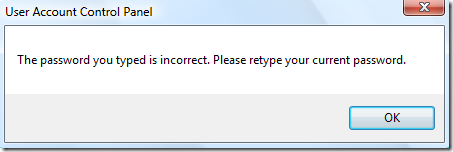
2. After entering the Current Password, New Password, Confirm new password and Password hint. This message appears:

password is incorrect

"The password you typed is incorrect. Please retype your current password"

3. Shocked by what happened, she quickly call and ask what to do.

What did I do? Think Deep...

If we will reboot or log-off the User, she needs the correct password to login to that account.

There are many possible ways to fix the problem:

1. Clear the Password

2. Use/Create a Password Reset Disk

3. and many more...

Simple Way: I told her to create a  new Administrator Account and remove the password

a. Open the User Accounts > "Manage another Account" > "Create another account"

b. Type the new Account name > Choose Administrator and afterwards, Click the Create Button

Thinking that if we restart or log-off the system, she will not be able to login to her account. I'm Correct! :)

c. After log-off, She cannot login to her account. I ask her to login to the NEW account that we have just created.

d. Finally, I told her to remove the password of her account by using the NEW Administrator Account:

Open the User Accounts > "Manage another Account" > Click the Account > Choose "Remove the password" link and finally, hit the Remove Password Button

:)

Updated: How to Change the Password using Command Prompt

Launch as Administrator: Type cmd in Start Search and press CTRL+ALT+Enter

Syntax:

Net User [Username] [P@assword]

or

Net User [Username] *

- Thanks Brian

Example: Net User LawrenceAlbert mynewp@assw0rd

             Net User LawrenceAlbert *

changingpassword 

Read more Tips: Windows Vista Tips, Tricks and Tweaks