Wednesday, August 13, 2008

"Application not found" Error Message in Vista/XP - 2

Go Back to Page 1 <<

Verifying the File in Simple Way (you can use other method):

I verified the file using AVAST Anti-Virus. How? Just Right-Click the file > Properties and it will give an alarm. You can use other Anti-virus like AVG, Kaspersky, McAfee, Norton, NOD32 and others...

Virus Found! My Hypothesis is Correct.

Malware name: Win32: Trojan-gen {Other}
Malware type: Virus/Worm

Now, Let's Go Back to the Problem and the Solution about the Message

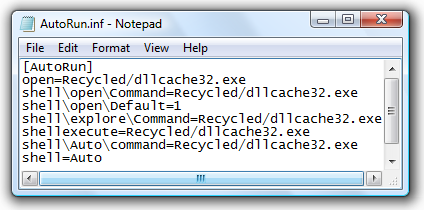
To Remove the Message, just delete the AutoRun.inf. For more details, Open AutoRun.inf and analyze the settings:
autoran_notepad5

From my situation (Please see at the picture above), it appears that the problem is caused by a setting in autorun.inf to launch a program that appears to be a virus called dllcache32.exe when the usb is inserted. Since, it cannot locate the program in the recycled folder, It will give the message "Application not found".

NIFTY SOLUTION: Therefore, just delete the autorun.inf. That's it!

Finally, Safely Remove the USB Device and insert it again.

In CD/DVD: Just open AutoRun.Inf and checked if the file that is set to open is damaged or corrupted.

Looks like hackers and virus writers are exploiting the autorun.inf to spread the virus.

Scary Things: On some computers, the autoplay is set to run or explore the external storage devices when it is inserted. It can be use to create and launch a Key logger program/virus. When you insert the USB Disk it will automatically run and start logging/getting information (passwords, usernames, account numbers, credit card information ANYTHING!).

Windows Vista Prevention Tips:

1. READ MESSAGES and Always Turn-ON UAC, It will be detected and ask you if you like to launch the program.

2. Remove Autoplay using WinBubble: Disable Auto Play in All types of Media

Now, Your a beginner in detecting worms... Cool Right?

Go Back to Page 1 <<


Read More:

[Vista/XP] Worm Busted Part 2! How to Detect, Clean/Remove Manually inside the USB Flash Drive

The Best Protection Against Worms in Windows Vista

What?! It's Another Worm: SVHOST.EXE and NEW FOLDER.EXE

Tuesday, August 12, 2008

Google (organic) Hits Restored

restored

Now, my Google Search Hits was restored. In the past few days, there are times that I almost give-up and started thinking about selling my blogsite. Although I did not suffer or experienced a large impact because large part of the hits (50-70%) I received, came from the users and website administrators all over the world. In the long term, you will not grow without Google's Help. Again Thank you so much guys... I will not forget your help, for your emails and suggestions...

How and What Did I Learned?

During the Days when you were down, you've started thinking on how to solved the problem.

1. Think Deep, Don't just do anything without thinking for several times.

2. Have some rest, Due to the two consecutive programs I released. I suffer extreme stressed for the first few days of the month. I learned how to control my emotions and give time for my mind to rest.

3. Be truthful, In my experiences with Google Adsense, They have the Best Customer Service I ever encounter. So, They will give time to check your website if it's clean.

4. Start Cleaning your website links...and follow this guide: Webmater Guidelines 

5. Be Truthful, they can check. Post and Ask Help at Google Webmaster Help Section

"I do not accept any payments or pay for the help given by several
communities around the world in sharing my software. If I see that
they wholeheartedly supported and share my software to others... I gave a link. Is that illegal? I'm very sorry, this is my first time.
"

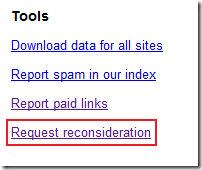
webmastertools6.  Login to your Google Webmaster Tools and Submit your website for reconsideration.
7. Wait and Pray...


If your lucky and Google approved your website for reconsideration:

Do not be careless again and always think before adding any links to your post/website.

Thank you Google! I have learned my lesson.


Friday, August 8, 2008

Day 6,7-8: WinBubble 1.75 Beta 2, Quality VS Quantity

The results...

finished

Now, WinBubble 1.75 Beta 1 is finished and plans for the Beta 2 version is on the way.

Beta 1: Increasing the Usability of Icon Tab

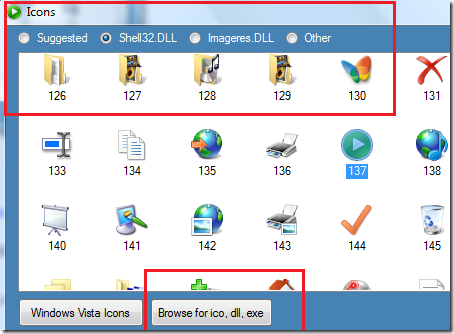
  1. The Icon Tab now supports DLL and EXE File Icons.
  2. The Drive Icon Customization can now detect different types of Drives (Fixed disk, CD/DVD, Virtual Drives, Network Drives, and Removable Drives).
  3. You can now customized your Drive Icons, Computer, Network, Control Panel Icon and Open Folder Icon without downloading icons from the Internet. You can accessed it easily using the Recommended or Suggested Vista Icons from your Windows System Files (Imageres.dll, Shell32.dll and others)
  4. Username folder and Desktop Icon Restore and Customization was added.
  5. Recycle Bin Icon Customization now automatically detects the current status.

Beta 2 Priority: Quality VS Quantity (Day 6, 7-8)

WinBubble now has a lot of Customization and Tweaks that is useful. The software can be use by Beginners, Intermediate and Advanced Windows Users.

In Beta 2, I will check and verify ONE BY ONE all the features (along with Beta testers) in the program. Detailing if the feature is needed or not and If there's a need to add another feature.

In the coming days, I'm going to post if there's a new feature that was requested or given by the users.

PLEASE STAY TUNED AND WAIT FOR THE FINAL RELEASE!

Monday, August 4, 2008

Day 1-2, 3-5: WinBubble 1.75 Beta 1

A Quick Look at the next version of WinBubble...

WinBubble175Beta1_2

Priorities: Increasing the usability of Icon Tab

1. WinBubble can now give suggestions regarding the icons.

2. You can now load Icon libraries in DLL and Files.

3. OEM Information Automatic Backup was updated.

4. Reset to Default Button was updated.

Day 3-5

I'm still writing the update for the new version.

I'm going to post some screenshot tomorrow.

And more updates...coming soon.

I've decided that I will make it available for download in Beta 2...

STAY TUNED AND ENJOY!!!

------------------------------------------------------------------

I would like to thank Calvin of NotebookReview.com for giving me a great advice.

"Just focus on your Software Lawrence..."

As simple as that... But it really helps.

Also, I would like to thank Mr. Agent Smith of Neowin.net. I think I'm going to use your suggestion about the INI File on another idea...

Thanks Guys!!!

Number One Gets the Best and Number Two takes what's Left

photo

Is this true and does it really matters? Most of the times this is true especially in big companies like Google, Microsoft and Apple. The ecology of Internet is changing day by day. People are getting smarter, shifting from television to Youtube, PC to cell phones and most of the times they don't care if what they are using the Best product, as long as they are enjoying the system and it provides a solution for their needs.

Most of the companies want's to be the Best. But is it really important? If you'll create thousands of Useful tools that is not the best but provide a solution for everyone's need. That will be great!

That is what I noticed. The measurement of Being the Best is based on the quantity of usefulness and the number of relevant solutions that they've solved.

Google provides a solution in search that do not based on the correct answer or original answer but based on the popularity of the answer. Most of the times, this is being manipulated and exploited not only by the hackers but the famous companies itself.

THE RESULTS

Due to it's nature, It will benefit All. Companies are happy with the system because they have the power to win the popularity contest (To be the Best) but in the end... The Original Answer or the Creator himself  ALSO WINS...

Negative Effect: Some companies may use the system to manipulate the answers.

Microsoft, No Doubt Windows is still the best OS from children to adult. If Linux and Apple can provide a solution for millions of people like Bill Gates did. That would be great!

Negative Effect: Microsoft controls all of them. The technology is being based on a single company only. This is good if they will work hard every single day.

Firefox became popular because it solved most of the problems in Internet surfing. IE7 Protected Mode is the response.

Who won? The PEOPLE ITSELF.

Now, Do you want to be the Best?

Friday, August 1, 2008

The First WinBubble Video in Youtube

This is the first WinBubble video that actually gave a detailed explanation about its features. Pretty Cool!

WinBubble, Great Application for Vista Part I

"This is basically a tuning application that's meant for Windows Vista only...It's very so Nice Service. It's a nice program because you can Tune-up a lot of things..."

Please take a look and have some fun. I'm planning to create a youtube video but I think, there's no need to do that. There's someone did it for me. Highly Recommended!

WinBubble, Great Application for Vista Part II

Thank you very much Mr. tjasko1!

Quick Tip: If you want to download the video, Download it using my new software called Youtube File Hack Tool or If you feel that it's not a Geek thing because it can be use only in Internet Explorer, Here's the manual way to download the video:

Youtube Hack! Manually Download and Save the Youtube Video.

It's easy!

Enjoy!!!

More WinBubble Video:

Hacking Bubbles Screensaver: The First WinBubble Video

Other Tutorials: Windows Vista Unlocks, News, Tips and Tweaks

Useless Stupid WinBubble Tip But Evolutionary: Creating a Button for my Picture and Video

Ok, I know your mind is already tired reading, hacking and learning about Windows Vista. So, Let's have some fun.

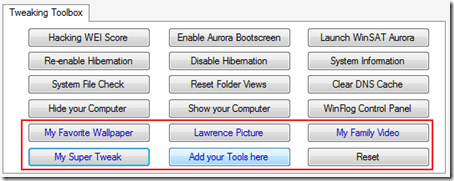
screenshot Did you know that WinBubble Tweaking Toolbox can create a button and run anything? As long as it can be run in Windows Explorer. WinBubble can run it too.

Let's try to add a picture: Open WinBubble and Go to Specific Tab. Click the "Add you Tools here" Button and select "All Files" in the Open Dialog Window.

addingAphoto

Choose any picture... porn, your favorite star. ANYTHING! and click Open

backgroundpic 

Input any name...

buttonname

Now, WinBubble has been customized... This will be the start of the evolution of creating an application.

Not Just For the Programmers... But For ALL!

Enjoy!!!

Super Tweak:

What if you create a Registry File full of Tweaks and Create a Button for that. That would be Great!!!