Sunday, May 31, 2009

Big Change: Windows 7 System Requirements

Microsoft gave us a glimpse about the minimum requirements and specifications for a computer running in Windows 7. Even if you install the OS in a 3-year-old PC, Windows 7 will work fast.

Here’s the quick list:

Processor speed
1 GHz 32-Bit or 64-bit processor or higher

Hard disk space
16 GB of available disk space

Memory (RAM)
1 GB of system memory or more

Graphics card
Support for DirectX 9 graphics with 128 MB memory (to enable the Aero theme)

One user asked me… “I want to Download Windows Seven. How Big is Windows 7 Installer setup”?

Almost 3/4 of DVD is used. You need:

Optical Drive
DVD-R/W Drive

Others
Internet Connection for Windows Updates

They also said that there is a possibility that it may also run on a  less powerful pc but they can’t guarantee the results.

Read more at Blog.UnlockForUs.Org

Friday, May 29, 2009

[Free] How to Watch and Download PBS-NOVA Programs: Science and Technology in Full Episodes

This is the coolest Discovery Channel and National Geographic like Movies in Youtube. By the way, It’s FREE!!! Sad to say, for now the pageviews are very low.

This is a reponse to Mr. ikh question: “Hi, Can you make this work… I want vids from PBS. http://www.youtube.com/show?p=lwRWg1czcnk

Thanks for asking!

The Great Robot Race: The Race of the Century

In this race there are no drivers. It’s the first race ever that the machines takes all the decisions.

I remember I watched this movie with my friends while working in Japan. This is the Best Robot Race I’ve ever seen! Nice Stanley!!!

Go Robo-Geeks!!! Someday I will make one… I have something for Stanley :D

Note: Downloading Youtube Videos needs permission to the uploader.

Saving Clips for Offline Viewing

Youtube File Hack 1.5, lets you to download these in two ways. One in Internet Explorer and in Google Chrome Bookmarks. Both of them is the Best way to Download Science and Technology Episodes from NOVA.

Downloading The Movies in Full Episodes in Internet Explorer downloaddiscoverychannel

Using Youtube File Hack Tool makes it easier to download them at once. You don’t need to watch it first and download. Just go to the List and Right-Click > Download… Choose the MP4 Format > CTRL+V for the Filename. That’s it!

PROS: Usability is great because of CTRL+V to Paste the Filename automatically. Also, You don’t need to open the Video.

CONS: You need to do more clicks

Adding the Bookmark in Google Chrome

Google Chrome is the lightest Web Browser app. It will only install and run in User-Level mode. If you don’t want to install the IE-Tweak and you want a simple and Faster way of Downloading the videos. It’s simple! Just Download Youtube File Hack Tool and Open Setup.exe and Click the Add Bookmark Button. Then Open Google Chrome and Start Downloading Youtube Videos!

Bookmark_thumb1[1]

PROS: Fast and no installation, just a Bookmark addition.

CONS: You need to change the Filename Manually and You need to open the video first.

I suggest to install both features… so that whatever browser you are using, you can save the videos. Read the Setup instructions first.

You don’t want to use Youtube File Hack

Ok, If you don’t want to download and use the program. You can add the bookmarks manually. Read Here, It is a Cross-Platform and Cross-Browser Youtube File Downloader.

It’s awesome in Windows 7, MP4 format is now supported by default.

Enjoy!!!

License Agreement

BY DOWNLOADING OR USING ANY SOFTWARE / DOCUMENTATIONS / BLOGS / ARTICLES FROM UNLOCKFORUS.BLOGSPOT.COM AND OTHER AFFILIATE WEBSITES. YOU ACKNOWLEDGE THAT YOU HAVE READ THE LICENSE AGREEMENT PUBLISHED IN THIS BLOG SITE AND YOU AGREE TO BE BOUND BY ITS TERMS. IF YOU DO NOT AGREE TO THE TERMS, DO NOT DOWNLOAD OR USE THIS SOFTWARE.

Monday, May 25, 2009

Windows Vista Home Premium is Asking for Product Key Activation

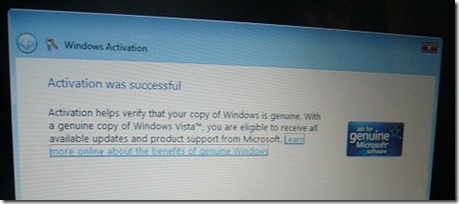
activationsuccessful

Several months ago I went to another place - before I arrived, my good old best friend went to ACER service center  to fix his computer.

During my stay, after several weeks with no problem, Windows Vista just stops working and asking for product key. Isn’t that odd?

“This is my newly installed laptop and I've just sent it to ACER to fix. I’m doing important things right now… and this thing happened. I’m calling ACER right-now.”

I told him to calm down and let me take a look first. Maybe it is just a security thing of Microsoft for anti-piracy. I realized that WinGuggle (my software to backup Windows Vista Serial Key) will not work this time.

“Why don’t you enter the product key at the back of your computer?”

It works!

genuine 

Here’s the picture in real situation:

P1150812 

Most of the laptops now:

  • No installation Disc (ACER, ASUS, HP and others). That’s why I always like DELL. The installer is included and you can customize everything but their International Service Centers is not that good compared to HP. HP Support in my experiences is among the best.
  • If you removed the sticker and lost it, that’s a huge problem if you don’t have the installation disc and the warranty is over.


Thanks!

Friday, May 22, 2009

Easily Remove or Set the OEM Logo and Support Information in Windows 7/Vista/XP

If you installed the Free released version of Windows 7, you will find out that there is no Original Equipment Manufacturer information like DELL, HP, ACER, ASUS and Lenovo logo.

oemlogo

Using WinBubbles-Lite 2009 you can separately customize or add a Logo in the System Properties, and Performance Information and Tools Window.

Also, you’ll noticed that when you set the logo in Performance Information and Tools Window, there is a difference between the size or layout in Windows 7 and Vista.

 windows7

The Logo became flat or wider in Windows 7.

Windows Vista

perf

That’s why I provided a separate Windows 7 OEM Logo Customization tool in WinBubbles-Lite 2009.

Hidden Tip for Windows 7 and Vista: User Accounts Pictures can be use as a logo. Just go to "C:\ProgramData\Microsoft\User Account Pictures" folder. If you can’t find the directory, press Alt-T > Folder Options > View Tab and Select “Show hidden files and folders

Simply Click the blank PictureBox to Add the logo, Put the information and press “Alt-A” or Click the Apply Button. That’s it!

For Windows XP Users: Read here

For Vista Users, Please read more about: Branding your Windows Vista Computer (especially the last part)

Removing the Logo in Windows 7, Vista and XP

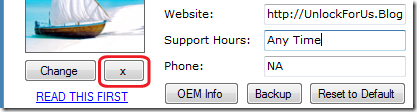
If you don’t care about customizing the Logo separately, I’ll suggest to use WinGuggle. The latest version: WinGuggle 1.6, is now an all-in-one tool that will let you Remove, Add or change the Logo and Support Information in Windows 7/Vista/XP.

screenshot

Simply Click the “X” Button > Apply Button and It will remove the Logo and OEM Information in your Computer.

To Restore: Push the Reset to Default Button.

That’s it… Enjoy!

Wednesday, May 20, 2009

Skip the Welcome Screen in Windows 7/Vista/XP

Almost a year ago… I used to work in one of the 100% - subsidiaries of one of the biggest companies in the world – actually it is included in the Top Fortune 500 companies and they have different products and Engineering Services like Ship Building, Weapons, Power Plants and many more. I worked in Power Plant Manufacturing and Engineering for almost 4 years as a DCS Engineer and later became a Design Engineer 2.

I remember my local team leader at home asked me when I was sent to Japan for work:

“How can I remove or disable entering of passwords in Windows?”

- “Just removed the password?” :D

Windows Vista

Last time, I wrote a short article in Windows Vista, read here:

Login Automatically in Windows Vista

Windows 7

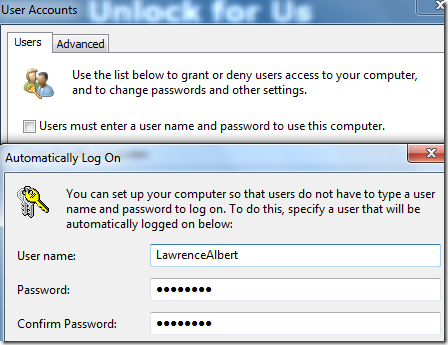
netplwiz

password

The procedure is the same in Windows 7…                             

Read the Article in Windows Vista and use the netplwiz utility. That’s it!

Using the Registry in Windows 7, Vista, Windows XP Home and Professional

Although all of these can be done using the registry, I will not recommend that because your password will be seen directly.

Go to HKEY_LOCAL_MACHINE\SOFTWARE\Microsoft\Windows NT\CurrentVersion\Winlogon

and create a new DefaultPassword string value and set your password.

 defaultpassword

Finally, set the three registry settings below:

  • DefaultUserName (String)
  • DefaultDomainName (String)
  • AutoAdminLogon (DWORD), set to 1

Windows XP Advanced User Accounts Window

The Advanced User Accounts Wizard only set these values and the password is not included (Great!)

HKEY_LOCAL_MACHINE\SOFTWARE\Microsoft\Windows NT\CurrentVersion\Winlogon

  • DefaultUserName (String)
  • DefaultDomainName (String)
  • AutoAdminLogon (DWORD), from 0 to 1 if activated.

Just launch the command Control Userpasswords2 from your Run Window

and the procedure is now the same in Windows 7 and Vista, Read Here.

That’s it!

Enjoy! :)

Tuesday, May 19, 2009

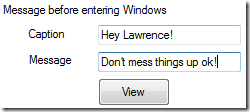
How to Add or Put Message Before Login in Windows 7/Vista/XP

A long time ago in a far away land… I used to live in a place in the other side of the country – actually it was my hometown in the old days. My sister asked me, “How can I set a message after I finished using the computer?“

This is a useful tip that many users doesn’t know. Most of us are sharing the computer to our family members. Now you can create a custom display message for them before using your computer. Companies often use this to show warnings.

messages

Works in any Windows Installation!

Ok, I know your a geek read here:

If you don’t want to mess things up in your computer. WinBubbles-Lite 2009 is here to save your day!

1. Download the program and extract the file.

2. Input the Title in the Caption part, your message and Click the Apply Button or simply press Alt-A.

3. Click the View button to test.

That’s it!

Simple, safe and useful…

Especially for me, I always forget small things because I’m doing a lot of things.

Anyway, Enjoy!

Monday, May 11, 2009

TweakUI For Windows 7 : The Ultimate Tweaker?

WinBubbles already received a lot of recognition in Windows Vista. And for that, Thank you to all the websites and authors that helped me to share the tool. WinBubble for Windows 7 will not participate in any competition regarding who’s the Ultimate Windows Customization and Tweaker for Windows 7.

winbubblelite

I will let the users decide and the great authors around the world.

I don’t believed that competition will give innovation. Inspiration, dedication, good and bad experiences will push the creation of a great product.

The truth is, at first I designed these tools because of the problems I had, some annoying User experiences, interesting concepts and dreaming to create a great software for everybody.

Not for Competition.

Well, If I can only have three sets of brains so that I will create products also in Mac, Linux and Windows at the same time.

That would be great :D

The problem is, I have less experience with Linux and totally no experience with the expensive Mac.

Fortunately, I have this hands of luck in programming and learning. I sit down and saw the free C# book given by Microsoft, and got interested with it.

IDEAS just came to me

After 7-8 weeks of designing and writing program in C#, RegDevelop was created. So, There is always a possibility that I can create also in other platforms. But I don’t know. If somebody will donate a Mac, new Linux Machine, a dozen books both programming and OS information. maybe… When I am programming and writing articles, It’s not like every hour I have this luck. It just pops up like a bubbles…

RegDevelop

regdevelop5 RegDevelop will enable novice to advance users to create the next TweakUI for Windows 7. Just read the instructions and tutorials first.

This time, novice users will have the opportunity to learn and if interested, they might go into programming, like the advance users.

Check WinBubbles-Lite, an application created using Regedevelop.

Advance users maybe will only use RegDevelop to create sample applications but I think It is better for them to write their own softwares using Visual Studio, Borland or any IDE Tools.

So, Please try to use RegDevelop and hopefully, any of you will create the Ultimate Windows 7 Tweaker (and Customization tool).

IDEAS will always be a part of innovation.

- Lawrence Albert -